
Image Hotspot Pro for HubSpot CMS
Turn One Photo Into a Clickable Story
Drop clickable markers anywhere on a photo, screenshot, floor plan, or product shot, and each one opens a clean card with a title, description, optional image, and a button. It is the easiest way to explain a product's features, walk users through a UI, label a map, or build a "shop the look", without writing a single line of code.
Get the Module Works with any HubSpot CMS theme · Pure vanilla JavaScript · $11.99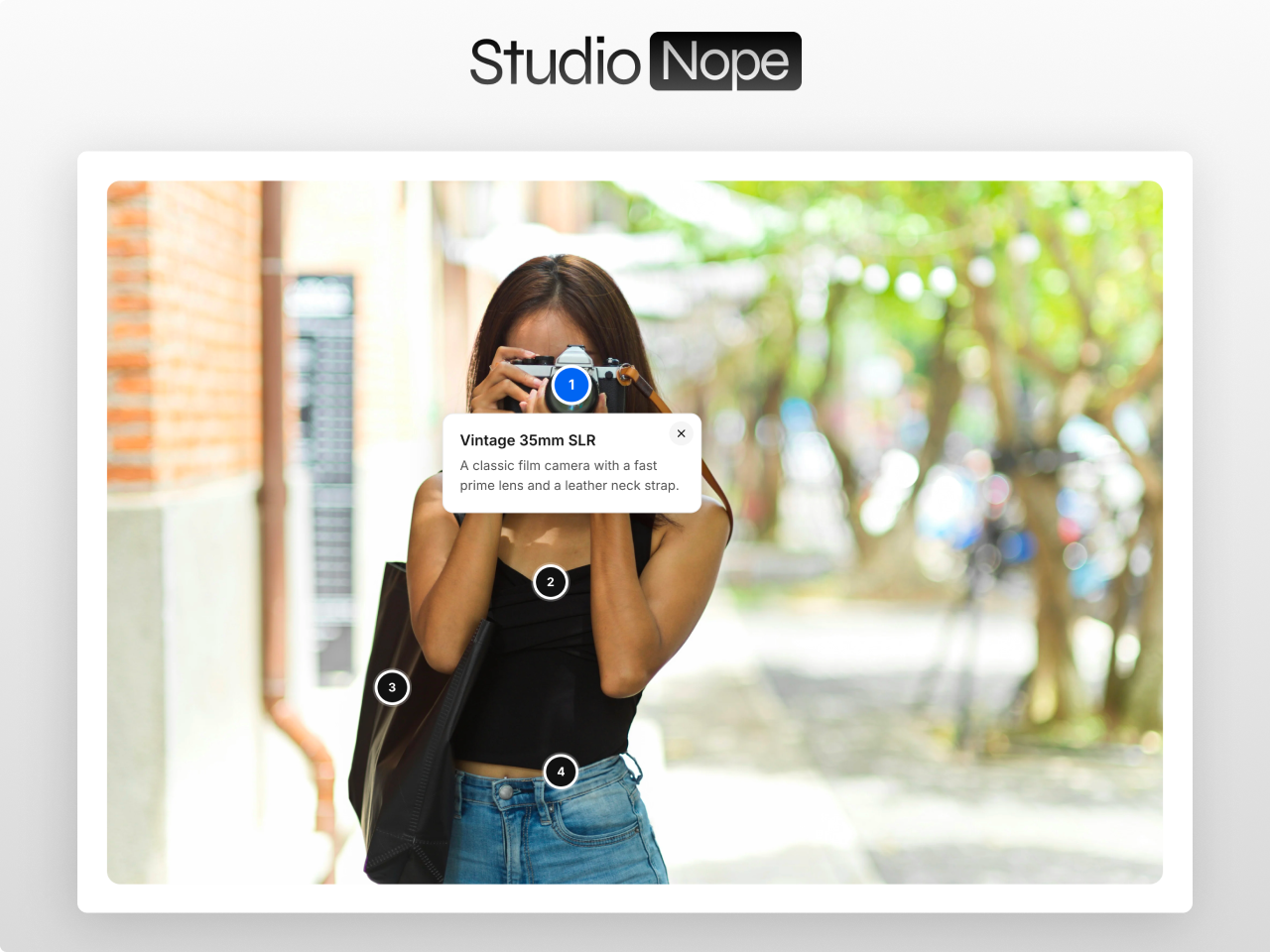
Built to get right what cheaper hotspot tools get wrong
Markers That Never Drift, Cards That Never Overflow
Percentage-based positioning keeps every marker glued to the right spot at any screen size, and tooltip cards flip near edges so they are always fully visible. The classic hotspot bugs, solved.
Styled Entirely From the Editor
Choose marker style (dot, ring, numbered, pin, plus, or a custom icon), colors, shadow, fonts, padding, and an image overlay to darken busy photos. Colors and fonts inherit your theme. No custom CSS, ever.
Mobile-Ready and Accessible
On phones, markers shrink and cards become a readable centered popup with an optional tappable list. Real buttons, full keyboard support, reduced-motion, and an SEO-friendly text list. No jQuery, no HubDB.
Five Marker Styles, or Your Own Icon
Pick dot, ring, numbered, pin, or plus, or bring your own Font Awesome icon. Color-code markers by category so a busy image still reads clearly, and tune size and shadow to match the photo underneath.
Rich Tooltip Cards
Each marker opens a card with a title, description, an optional image, and a button, so a hotspot can do more than label a point: it can sell a feature, link to a page, or tell the next part of the story.
A Few KB of Vanilla JavaScript
It ships as a few KB of vanilla JavaScript with no jQuery and no HubDB, so it stays fast and works on any HubSpot theme. Multiple instances run happily on the same page.
What you can build
Image Hotspot Pro fits any image that has more to say than a caption. Here are four common uses.
Product feature explainer
Pin markers to a product shot and let each one open a card describing a feature, with an image and a button, so visitors explore the product instead of reading a spec list.
Guided UI walkthrough
Drop numbered markers on a screenshot to walk users through an interface step by step, each card explaining one part of the screen without a video or a separate tour tool.
Interactive map or floor plan
Label a venue map, campus, or floor plan with markers that open details on demand, color-coded by category so a dense layout still reads clearly.
Shop the look
Mark each item in a lifestyle photo and link it to a product, turning one image into a clickable, shoppable story with no code.
Works with any HubSpot theme
Image Hotspot Pro is a standalone module. Install it in any HubSpot CMS portal and drop it on any page, including website pages, landing pages, and blog posts. No theme dependency, no jQuery, no HubDB, no external libraries. Just a few KB of vanilla JavaScript.
Questions
Do the markers stay in place when the image scales?
addWhat can I put in a hotspot?
addHow does it behave on mobile?
addHow much can I style, and is it good for SEO?
addTurn one photo into a clickable story with Image Hotspot Pro
Percentage-locked markers, tooltip cards that never overflow, five marker styles or your own icon, full editor styling, a mobile centered card with a tappable list, and an SEO text list. No code required.
Get the ModuleRelated modules: Before After Pro · Image Gallery Pro · Location Map Pro · All Modules