
Team Directory Pro for HubSpot CMS
Filterable Team Pages with Search, Department Tabs & Bio Modals
A standalone team directory module with grid and list layouts, real-time search, auto-generated department filter tabs, and detail modals with rich text bios, contact info, and social links. Up to 30 members per instance with full keyboard accessibility. 50+ style controls.
Get the Module Works with any HubSpot CMS theme · Pure vanilla JavaScript · $9.99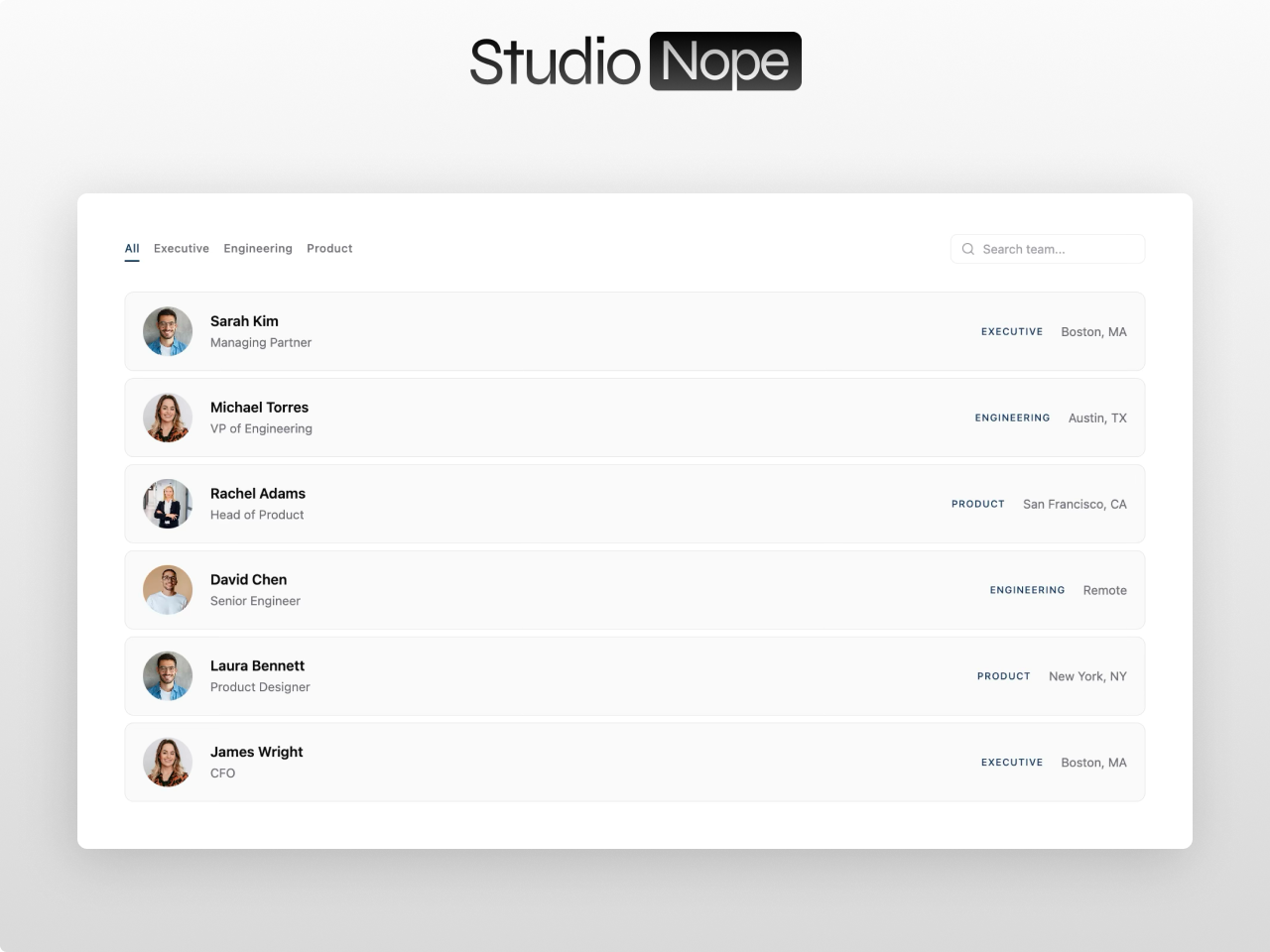
HubSpot does not have a real team directory
Default team modules are static grids. No search, no filtering, no detail views. When your team grows past 10 people, visitors scroll endlessly through cards with no way to find who they need.
A team directory that actually works
Team Directory Pro gives your visitors search, department filters, and bio modals so they can find the right person in seconds instead of scrolling through a wall of headshots.
Search and filter by name, role, or department in real time.
Grid cards or compact list rows with auto-generated department tabs.
Detail modals with photo, bio, contact info, and social links.
Everything you need in a team directory
Grid and list layouts
Photo card grid in 2-4 columns or compact list with circular thumbnails. Both open detail modal on click.
Department filter tabs
Auto-generated from member data. Pill or underline style. When a department has zero matches from search, its tab hides automatically.
Real-time search
Debounced keyword search across name, role, and department. Combines with department filter for multi-criteria results.
Bio detail modals
Click any member to open a modal with full photo, rich text bio, phone, email, location, and up to 8 social links. Focus trapped, closes via button, backdrop, or Escape.
50+ style controls
17 color fields with opacity, card padding/radius/shadow, image aspect ratio and hover zoom, filter styling, modal design, typography controls, responsive breakpoints.
Fully accessible
Focus-visible outlines, keyboard navigation, ARIA attributes, focus trap in modals, screen reader support, lazy loaded images. Semantic HTML throughout.
What you can build
Team Directory Pro adapts to any organization size. Here are four ways teams use it.
Large company staff directory
Search bar for finding employees by name across departments. Department tabs filter the grid instantly. Bio modals show detailed profiles with education, certifications, and contact information. Grid and list view toggle.
Professional services firm
Filterable directory for attorneys, consultants, or advisors. Department tabs organize by practice area or specialty. Social links connect to LinkedIn profiles. Rich text bios support credentials and bar admissions.
University faculty directory
Search by professor name, filter by department or school. List view for compact display of large faculties. Bio modals with research interests, publications, and office hours. Keyboard accessible for compliance.
Healthcare provider directory
Filter doctors by specialty with department tabs. Grid layout with professional headshots and credentials. Bio modals with accepting new patients status, insurance information, and appointment booking links.
Built for
- check Agencies and consultancies with department-based teams
- check SaaS companies showing engineering, design, sales, and support teams
- check Law firms and financial advisors displaying partner and associate profiles
- check Universities and educational institutions with faculty directories
- check Healthcare organizations with provider directories
- check Any organization with 10+ team members that needs search and filtering