
Resource Library Pro for HubSpot CMS
Filterable Resource Hub with Live Search, Detail Drawer & Gated Content Badges
A filterable, searchable resource library for HubSpot CMS. Grid and list views, auto-generated category filters, live search across titles and descriptions, slide-in detail drawer with rich content, gated and free badges, and 70+ style controls. Up to 100 resources per instance. No HubDB required.
Get the Module Works with any HubSpot CMS theme · No HubDB required · $9.99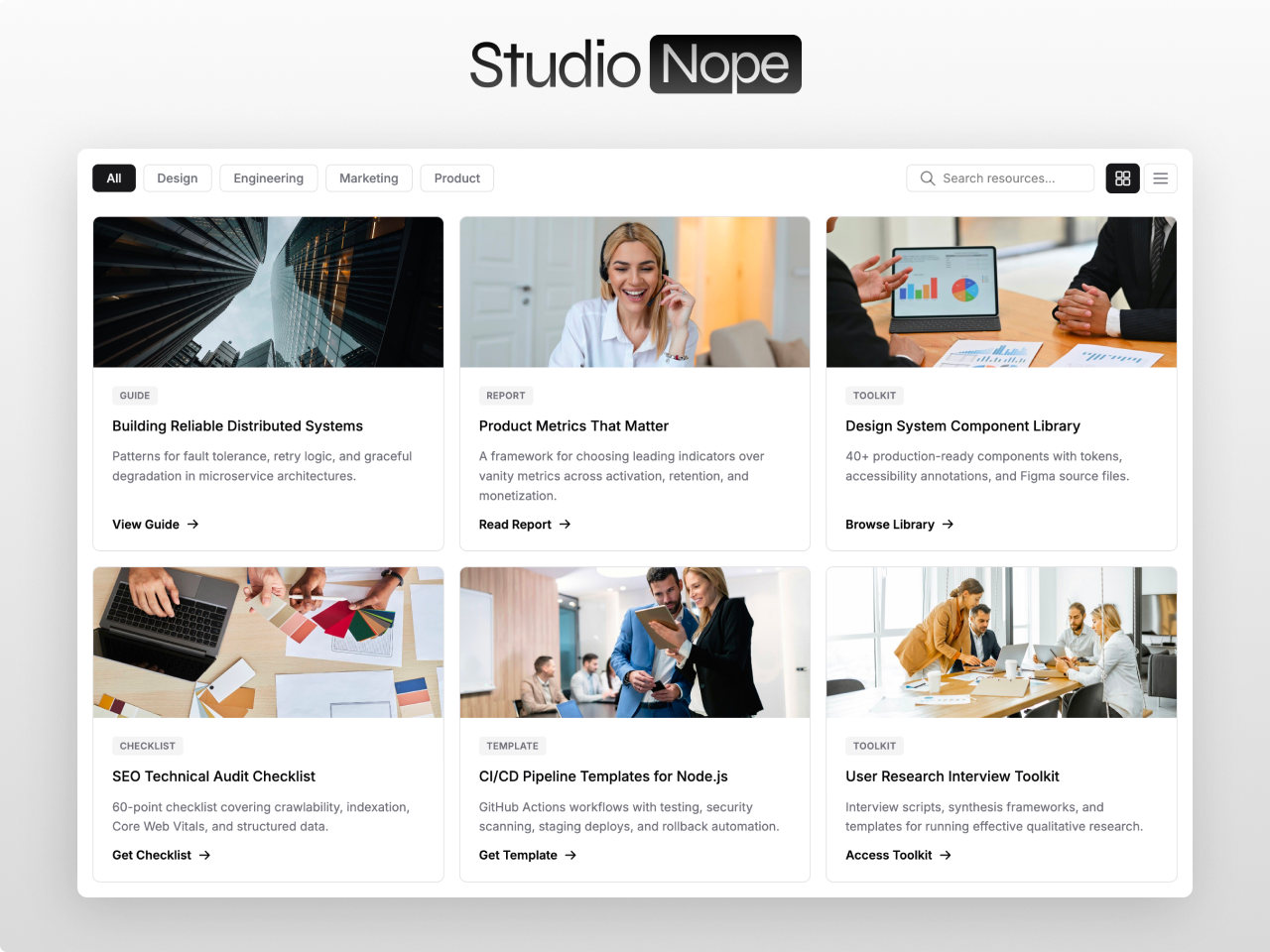
Everything you need in a resource library
Repeater-Based Management
Add up to 100 resources directly in the page editor. Each resource has fields for title, description, thumbnail, resource type, category, external URL, and gated or free status. No HubDB tables, no database configuration, no developer setup.
Auto-Generated Filters
Category filter pills appear automatically based on your resource data. Add a new category to any resource and the filter appears instantly. Remove all resources in a category and the filter disappears. No manual filter management.
Live Search
Real-time filtering across titles, descriptions, and resource types simultaneously. Results update as visitors type with no page reload. Combined with category filters for precise content discovery. Clear button resets all filters at once.
Slide-In Detail Drawer
Three click modes: drawer, direct link, or non-clickable. The drawer slides in from the right with rich content, thumbnail, resource type badge, description, and a download or access link. Focus trapping and escape-to-close for accessibility.
Grid and List Views
Toggle between grid layout (2 to 6 columns) and list view. Grid shows thumbnail cards with hover effects. List shows compact rows with inline metadata. Responsive breakpoints collapse columns on smaller screens automatically.
Gated Content Badges
Each resource can be marked as gated or free. Gated resources display a visual badge and can link to a landing page with a HubSpot form. Free resources link directly to the file or URL. Visitors see the distinction immediately.
Accessible by Default
WCAG 2.1 AA compliant. Keyboard navigation through all resource cards, filters, and the detail drawer. Focus trapping in the drawer. ARIA attributes on interactive elements. Screen readers announce resource titles, types, and gated status.
70+ Style Controls
Card backgrounds, border radius, thumbnail aspect ratio, hover shadows, filter pill colors, search bar styling, drawer width and background, badge colors, font families, font sizes, spacing, and responsive breakpoints. Light, dark, or branded designs without CSS.
What you can build
Resource Library Pro works for any content that visitors need to browse and filter. Here are four ways teams use it.
Marketing resource center
Ebooks, whitepapers, case studies, and webinar recordings in one filterable hub. Gated badges drive form submissions for lead generation. Category filters let visitors find resources by topic, format, or industry. Search narrows results instantly.
Documentation and knowledge base
Product guides, API references, setup tutorials, and troubleshooting articles organized by category. List view for dense content. Detail drawer shows summaries before visitors navigate to the full document. Free access, no gating needed.
Template and toolkit library
Downloadable templates, spreadsheets, checklists, and toolkits. Thumbnails preview each resource. Some free, some gated behind a form. Category filters for department, use case, or format. Grid view with hover effects.
Partner or vendor directory
Partner profiles, vendor listings, or integration catalogs. Each card shows a logo, company name, category, and description. Detail drawer reveals full profiles. Category filters for industry, tier, or region. Search finds partners by name or specialty.
Works with any HubSpot theme
Resource Library Pro is a standalone module. Install it in any HubSpot CMS portal and drop it on any page including website pages, landing pages, and blog posts. No theme dependency, no jQuery, no HubDB. Pure vanilla JavaScript. Compatible with CMS Starter tier.
Questions
Does it require HubDB?
addHow many resources can I add?
addDoes it support gated content?
addDo you offer support?
addBuild your resource hub with Resource Library Pro
The most flexible resource library module on the HubSpot Marketplace. Filterable grid and list views, live search, auto-generated category filters, detail drawer, gated content badges, and 70+ style controls.
Get the ModuleRelated modules: Integration Showcase Pro · Blog Carousel Pro · Content Tabs Pro · All Modules